


Compare top real estate CRM companies with verified pricing, features & reviews. Find the best platform for agents, teams & brokerages.
Products and Tools Mentioned in this Post


Follow Up Boss
Follow Up Boss is a real estate CRM that helps agents manage leads, automate follow-up, and increase conversions. Streamline your sales process today.


Real Geeks
Real Geeks offers real estate agents an all-in-one platform with lead generation, IDX websites, and CRM tools. Grow your business with proven technology.
Top Producer
Top Producer is a comprehensive CRM system for real estate agents featuring contact management, lead generation, email marketing, and task automation tools.
Wise Agent
Wise Agent is a comprehensive real estate CRM offering contact management, transaction tracking, email marketing, and automation tools for agents and brokers.

Table of Contents
- What's a Real Estate CRM?
- Key Features to Evaluate in Any Real Estate CRM
- Top Real Estate CRM Companies: Platform Comparison
- Platform Deep Dives
- CRM Selection Guide by Use Case
- Pricing and What You Actually Pay
- AI Capabilities: Where Platforms Are Heading
- Data Security, Compliance, and Privacy
- Migrating from Spreadsheets or a Legacy CRM
- Measuring CRM ROI: What to Track
- CRM Features for Specialized Real Estate Niches
- Conclusion: Choosing the Right Real Estate CRM
- Frequently Asked Questions
Top real estate CRMs do way more than just file contacts in a database — they pull every lead source into one place, handle follow-up on autopilot, and put your entire pipeline on a single screen. We've reviewed the platforms that actually work for solo agents, growing teams, and full brokerages, complete with current pricing and straight talk about what each one does best and where it stumbles.
New to real estate tech? Our deep dive into Top Real Estate Companies 2026: Platforms & Services Reviewed shows you how CRMs fit into the full toolkit that agents and investors are using right now.

What's a Real Estate CRM?

A Customer Relationship Management (CRM) system pulls all your client interactions, deal history, and prospect data into one place. For real estate professionals, that means tracking buyers and sellers from that first inquiry all the way through closing—and then staying connected long enough to actually generate repeat and referral business.

MLS/IDX integration. Property preference tracking. Transaction milestone pipelines. Lead capture from Zillow, Realtor.com, and Facebook Lead Ads. That's what separates a real estate CRM from a spreadsheet or a generic sales platform. You could technically force Salesforce or HubSpot to work for your deals, but you're burning time and money building what real estate-native platforms already ship with. Why reinvent the wheel?
Every major platform now runs on the cloud. Your data sits on the vendor's servers, and you access it from any browser or mobile app. That matters when you're bouncing between the office, your car, and showings all day. On-premise setups? They're basically extinct in residential real estate, except maybe at massive enterprise brokerages with their own IT teams.
Back to topKey Features to Evaluate in Any Real Estate CRM
Contact and Lead Management
Your contact database needs to do way more than store names and phone numbers. The best platforms capture buyer budget ranges, preferred neighborhoods, desired property types, timeline to purchase, and your entire communication history with each lead. That cold lead sitting in your spreadsheet for 90 days? A solid CRM resurfaces it automatically with a task prompt instead of letting it disappear forever.
Lead capture should pull from everywhere you operate. Website forms, Zillow, Realtor.com, Facebook and Google ads, inbound calls, SMS — the top platforms integrate with 200+ lead sources. Every new inquiry lands in the same inbox with the same workflow triggered automatically, regardless of where it came from.
Automated Lead Routing and Distribution
Speed-to-lead directly impacts your conversion rates. That's why smart lead routing matters for teams and brokerages. Instead of a team leader manually forwarding Zillow leads to agents each morning, your CRM assigns inbound leads based on rules you set — geography, price range, agent capacity, round-robin rotation. Faster assignment means faster first contact.
Transaction and Pipeline Management
Your real estate pipeline includes way more than just prospect to closed. You're tracking offer stages, inspection contingencies, appraisal status, loan condition deadlines, and title milestones. The right CRM lets you customize pipeline stages to match your actual process, attach documents at each stage, and trigger automated task reminders when deadlines approach.
Communication Tools: Two-Way Texting, Email, and Calling
Meet your clients where they already are. Modern real estate CRMs come with built-in two-way SMS, email drip campaigns with behavioral triggers, and VoIP calling with optional call recording. For details on how call recording works across platforms — and the legal compliance side of things — check out Real Estate CRM Call Recording Features: Best Platforms & Legal Compliance.
Email drip campaigns are some of the highest-ROI tools in real estate CRM. The platforms that crush it use behavioral triggers — like sending a follow-up text the moment a lead clicks a listing link — instead of static time-based sequences. Want to dive deeper? Our guide to Best Real Estate CRM With Drip Campaign Features covers automation in detail.
AI and Autonomous Task Handling
AI in real estate CRM has matured fast. You're getting predictive lead scoring that flags which contacts are most likely to transact soon. But several platforms now go further — AI agents that draft follow-up emails in your voice, respond to SMS inquiries 24/7, and route hot leads to agents in real time without you lifting a finger. The gap between platforms is widening here, and newer tools are pulling away from legacy software.
Reporting, Dashboards, and Performance Benchmarks
Real-time dashboards show you which lead sources actually convert, how long deals sit in each pipeline stage, and which agents on your team outperform the rest. The best platforms go further — benchmarking response time (minutes between lead capture and first contact), conversion rate by source, and average deal velocity measured in days from first contact to closing.
Document Management
Transaction-ready CRMs include document storage, e-signature integrations (DocuSign or Dotloop are standard), and sometimes native contract generation templates. You eliminate the need for a separate filing system and keep all transaction documents tied directly to the contact record where they belong.
Back to topTop Real Estate CRM Companies: Platform Comparison
What you're looking at below is the current landscape as of November 2026. The pricing here comes straight from verified sources. When you see "custom pricing," that's code for: no public number exists, so you'll need to hop on a demo call and get a quote.
| Platform | Best For | Starting Price | Free Tier | Native IDX/MLS | AI Features | Standout Capability |
|---|---|---|---|---|---|---|
| Follow Up Boss | High-volume teams, multi-source leads | $69/user/month | 14-day trial only | Via integrations | Yes (AI calling, lead scoring) | 200+ lead source integrations; Zillow-owned |
| Wise Agent | Solo agents, budget-conscious teams | $49/month (up to 5 users) | No | Via integrations | Limited | Flat-rate pricing; transaction management included |
| Salesforce Sales Cloud | Growing brokerages, custom workflows | $25/user/month | No | Via AppExchange add-ons | Yes (Einstein AI) | Deepest customization; enterprise-grade automation |
| HubSpot CRM | Marketing-focused agents and teams | $0 (free tier, 2 users) | Yes | Via integrations | Yes (AI content, scoring) | Free tier; integrated marketing hub |
| Lofty (formerly Chime) | Lead generation focus, farm areas | ~$500–$600/month (est.) | No | Yes (native IDX) | Yes | Native IDX website + lead gen built in |
| BoldTrail | All-in-one brokerage tech stack | Custom pricing | No | Yes (native IDX) | Yes | IDX + back office + CRM in one platform |
| Rechat | Full brokerage tech replacement | Custom pricing | No | Yes | Yes | Complete tech stack with marketing automation |
| Top Producer | Lead nurturing, long-cycle relationships | Contact vendor | No | Yes (Market Snapshot) | Limited | Long-term nurture campaigns; Market Snapshot tool |
| IXACT Contact | New agents building their database | Contact vendor | No | Via integrations | Limited | Simple onboarding; social stream included |
| Real Geeks | Small teams with IDX website needs | Contact vendor | No | Yes (native IDX) | Yes (AI assistant) | IDX website + CRM combo at team-friendly price |
| Pipedrive | Investors managing multiple portfolios | Contact vendor | No | Via integrations | Yes (AI sales assistant) | Visual deal pipelines; flexible for investment use cases |
| Zoho CRM | Cost-conscious teams wanting deep customization | Contact vendor | Yes (3 users) | Via integrations | Yes (Zia AI) | Broad feature set; competitive pricing |
Note: Lofty's ~$500–$600/month estimate reflects real-world base costs reported by agents as of 2026; Lofty doesn't publish official pricing. Want a quote from BoldTrail or Rechat? Schedule a demo and they'll give you the numbers.
Back to topPlatform Deep Dives
Follow Up Boss — Best for High-Volume Teams
Zillow Group paid $400 million plus up to $100 million in earnouts for Follow Up Boss back in late 2023. It's still one of the most popular real estate CRMs among production teams—and for good reason. The real strength? Over 200 lead source integrations. We're talking Zillow, Realtor.com, Facebook, every major lead vendor you can think of. Everything lands in one inbox.


As of 2026, pricing breaks down like this: Grow plan is $69/user/month on monthly billing, or $58/user/month annually. Pro plan (10 users included) runs $499/month on monthly billing or $416/month annually. Platform plan (30 users included) goes for $1,000/month on monthly billing or $833/month annually. Here's what catches most teams off guard: calling and texting aren't included. That's an add-on at $39/user/month on monthly billing or $33/user/month annually for Grow plan users. If your team lives on the dialer, that cost stacks fast.
The catch: Follow Up Boss is a contact and communication CRM. Period. No native IDX website. No in-house lead gen tools. If you need an all-in-one platform where lead generation is baked in, look at Lofty or BoldTrail. For a full breakdown comparing CRM-focused versus lead-generation-focused platforms, check out our guide to the Best Real Estate Lead Generation Platforms 2026.
Wise Agent — Best Budget Option
Solo agents and small teams love Wise Agent because you're not bleeding money on per-user fees. The base plan is $49/month for up to 5 team members, or $42/month ($499/year) on annual billing. Add WiseSocial for social media scheduling and you're at $69/month. Two-way texting (WiseText) is an extra $11/month plus an $80 one-time registration fee.
Contact management, transaction management, drip campaigns, landing pages, referral tracking for your sphere. What you won't get is the integration depth or AI sophistication of premium platforms. But if you're mostly working phone and email with a focused database? Wise Agent covers about 90% of what you actually need, without the premium price tag.
Salesforce — Best for Custom Workflows and Scale
Salesforce isn't a real estate CRM out of the box. But its AppExchange marketplace has real estate modules. And once you get into workflow automation (Flows), AI capabilities (Einstein), and reporting? Nothing touches it for brokerages willing to invest in proper setup. Starter Suite starts at $25/user/month. Pro Suite runs $100/user/month. Then it scales to $195, $395, and $550/user/month for Core, Advanced, and Max editions.
Real talk: Salesforce's complexity is both a superpower and a wall. You'll need setup time. You might need a Salesforce admin or consultant building out those real estate workflows. Best-fit scenario? Brokerages with 20+ agents, a dedicated operations person, and growth plans.
HubSpot — Best for Marketing Integration
The free CRM tier ($0 for up to 2 users) is a real, functional product—not a crippled trial. Contact management, deal pipelines, basic email. Agents who handle their own marketing find HubSpot hard to pass up because the same platform powers your CRM, email campaigns, landing pages, and social monitoring. Paid tiers start at $20/seat/month (Starter), then $100/seat/month (Professional) and $150/seat/month (Enterprise).


Watch for onboarding fees: $1,500 for Professional and $3,500 for Enterprise. And the full CRM Suite Enterprise bundle starts at $4,700/month—that's brokerage territory. Individual agents? Start with the free tier or Starter plan.
Lofty (Formerly Chime) — Best for Lead Generation-Focused Teams
Lofty bundles a native IDX website, paid lead generation, and CRM all together. Run a geographic farm? Lofty's exclusive area targeting lets you lock down specific zip codes without competing against other Lofty users in your territory. Pricing isn't public—Agent, Team, Broker, and Enterprise plans all require a demo. Real-world 2026 data suggests base costs starting around $500–$600/month before add-ons. That's real money, best suited to agents with enough volume to justify it.
BoldTrail and Rechat — Enterprise All-in-One Stacks
Both position themselves as complete tech replacements for entire brokerages. CRM, IDX website, back-office transaction management, marketing tools, reporting—all one roof. Neither publishes pricing. Both require custom demos. Want to understand how these all-in-one CRM and website builder combinations actually work? Our article on the Best Real Estate CRM With Website Builder: All-in-One Platforms covers this space thoroughly.
LionDesk was once a solid mid-range option. It's been wound down as a standalone product now. If you're still running LionDesk, migration to Lone Wolf Relationships should be on your priority list.
Back to topCRM Selection Guide by Use Case
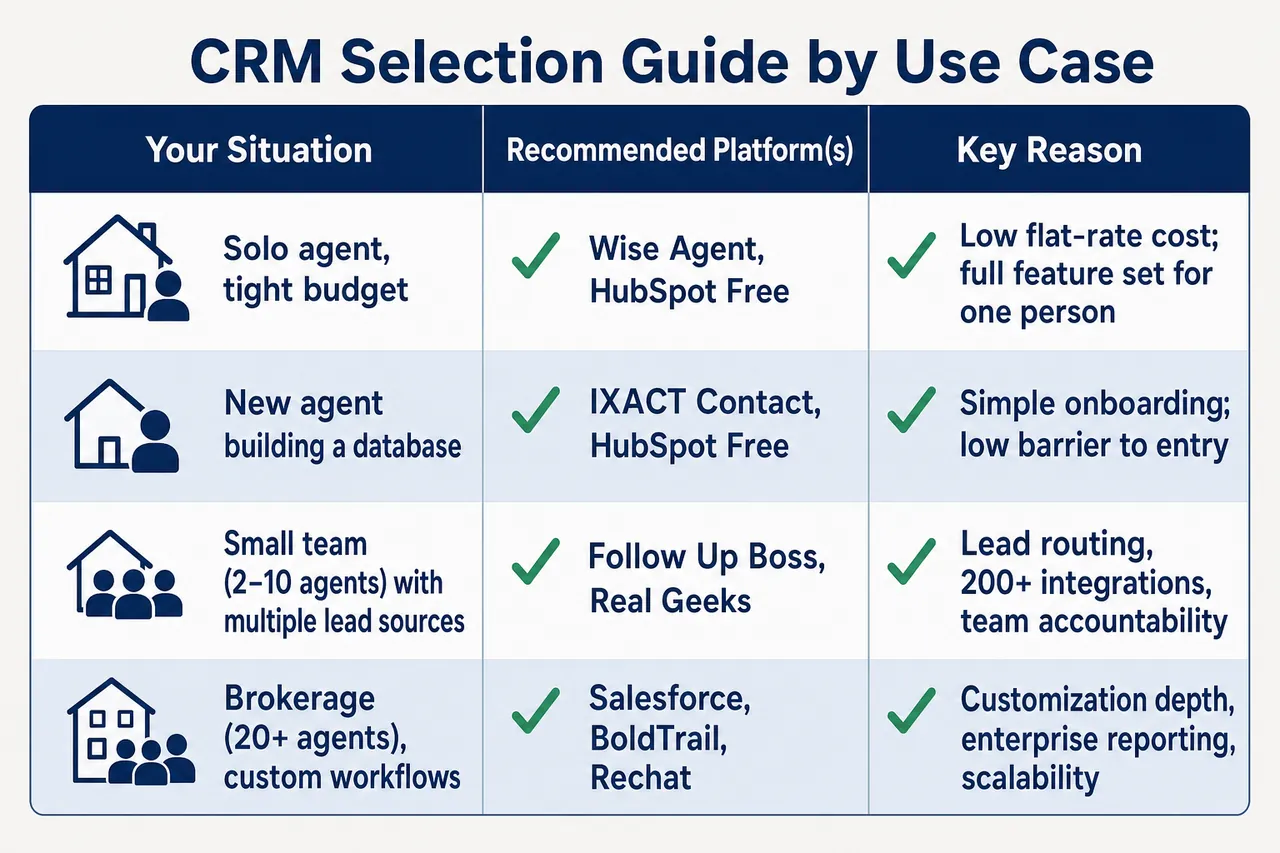
| Your Situation | Recommended Platform(s) | Key Reason |
|---|---|---|
| Solo agent, tight budget | Wise Agent, HubSpot Free | Low flat-rate cost; full feature set for one person |
| New agent building a database | IXACT Contact, HubSpot Free | Simple onboarding; low barrier to entry |
| Small team (2–10 agents) with multiple lead sources | Follow Up Boss, Real Geeks | Lead routing, 200+ integrations, team accountability |
| Team focused on lead generation and IDX | Lofty, Real Geeks, BoldTrail | Native IDX website + CRM in one platform |
| Marketing-first agent or team | HubSpot | Best integrated email marketing and campaign tools |
| Brokerage (20+ agents), custom workflows | Salesforce, BoldTrail, Rechat | Customization depth, enterprise reporting, scalability |
| Real estate investor managing multiple portfolios | Pipedrive, Zoho CRM, HighLevel | Flexible pipelines; not limited to residential agent workflows |
| Long-cycle nurturing (sphere, past clients) | Top Producer, Follow Up Boss | Long-term drip campaigns; market update automation |
Standard agent-focused CRMs often don't fit how investors actually work. You're managing deal analysis, acquisition pipelines, and rent roll tracking—data structures that look nothing like a buyer or seller pipeline. Want a deeper dive? Check out our comparison of HighLevel CRM vs. Pebble: Real Estate Investor Tool Comparison.
Back to topPricing and What You Actually Pay
CRM sticker prices lie. What you see advertised is never what you'll actually spend — there's always something hiding in the fine print.
- Per-user vs. flat-rate pricing: This is where the math breaks down fast. Follow Up Boss charges per user; Wise Agent caps it at $49/month for up to 5 users flat. Run a 4-agent team? Wise Agent costs you $49/month total. Follow Up Boss? That's $276/month (4 × $69). But don't just pick the cheaper option — Follow Up Boss actually integrates deeper at scale, so you're trading dollars for functionality here.
- Add-on costs: Calling, texting, dialer features — they're almost never included. Follow Up Boss calling runs $39/user/month on the Grow plan. Want two-way texting in Wise Agent? That's $11/month plus an $80 setup fee. These stack up fast.
- Mandatory onboarding fees: HubSpot's the worst offender here — $1,500 at Professional and $3,500 at Enterprise. And you can't negotiate them away.
- Lead source costs: Your CRM doesn't generate leads. It just stores them. If you're pulling from Zillow, Realtor.com, or other portals, that's completely separate from your software bill. Check our breakdown of the 6 Best Places to Buy Real Estate Leads to see what each source actually costs per lead.
- Contract terms: HubSpot's free tier and Wise Agent lock you in month-to-month. Higher Salesforce tiers and Lofty? Annual commitments only.
AI Capabilities: Where Platforms Are Heading
The gap between AI-capable and AI-limited CRMs is widening in 2026. Major platforms are splitting into two camps — those automating deal flow and those just managing it.
- Salesforce Einstein AI: Lead scoring, predictive analytics, automated email drafting, and conversational AI for sales reps. Available on Core plan and above.
- HubSpot AI: AI-generated email copy, deal scoring, and conversation intelligence available on Professional and Enterprise tiers.
- Follow Up Boss AI: AI-powered calling and lead qualification that can conduct initial phone conversations autonomously, escalating hot leads to agents in real time.
- Lofty AI: Autonomous AI assistant that follows up with new leads via text and email around the clock, qualifies intent, and routes qualified prospects to agents.
- Real Geeks: AI assistant (George) handles initial lead responses via SMS, reducing the time between lead capture and first meaningful contact.
Autonomous AI agents are becoming the standard for high-volume teams. These systems handle the first several touches without human intervention. But if you're doing fewer than 50 leads a month, the AI layer won't move the needle compared to solid pipeline and communication tools. Running hundreds of leads monthly from paid sources? AI qualification isn't a nice-to-have anymore—it's table stakes.
Back to topData Security, Compliance, and Privacy
Your real estate CRM holds everything that matters: financial profiles, property ownership records, negotiation timelines, personal contact info. That's not just convenient—it's a legal liability if you're not careful about compliance.
- Data encryption: Salesforce, HubSpot, Follow Up Boss—they all encrypt data at rest and in transit. But don't take that for granted. Verify the encryption spec explicitly before you sign any contract.
- Call recording disclosure: Does your CRM record calls? Then you need to know your state's wiretapping laws. Some states demand all-party consent; others don't. Get it wrong and you're exposed. We've got the full breakdown in our article on Real Estate CRM Call Recording Features: Best Platforms & Legal Compliance.
- TCPA compliance: Built-in texting or auto-dialing features fall under Telephone Consumer Protection Act rules—no way around it. Your platform needs opt-out management and consent tracking baked in. Test this before you send a single mass SMS campaign.
- Data ownership: Cancel your subscription tomorrow. Can you actually export your data? Some platforms make this painless with CSV downloads. Others charge you or bury the feature. Ask explicitly—it matters when you're switching systems or going out of business.
- Role-based access: Running a team? Make sure agents can only see their own leads. The last thing you need is someone downloading your entire database on their way out the door.
Migrating from Spreadsheets or a Legacy CRM
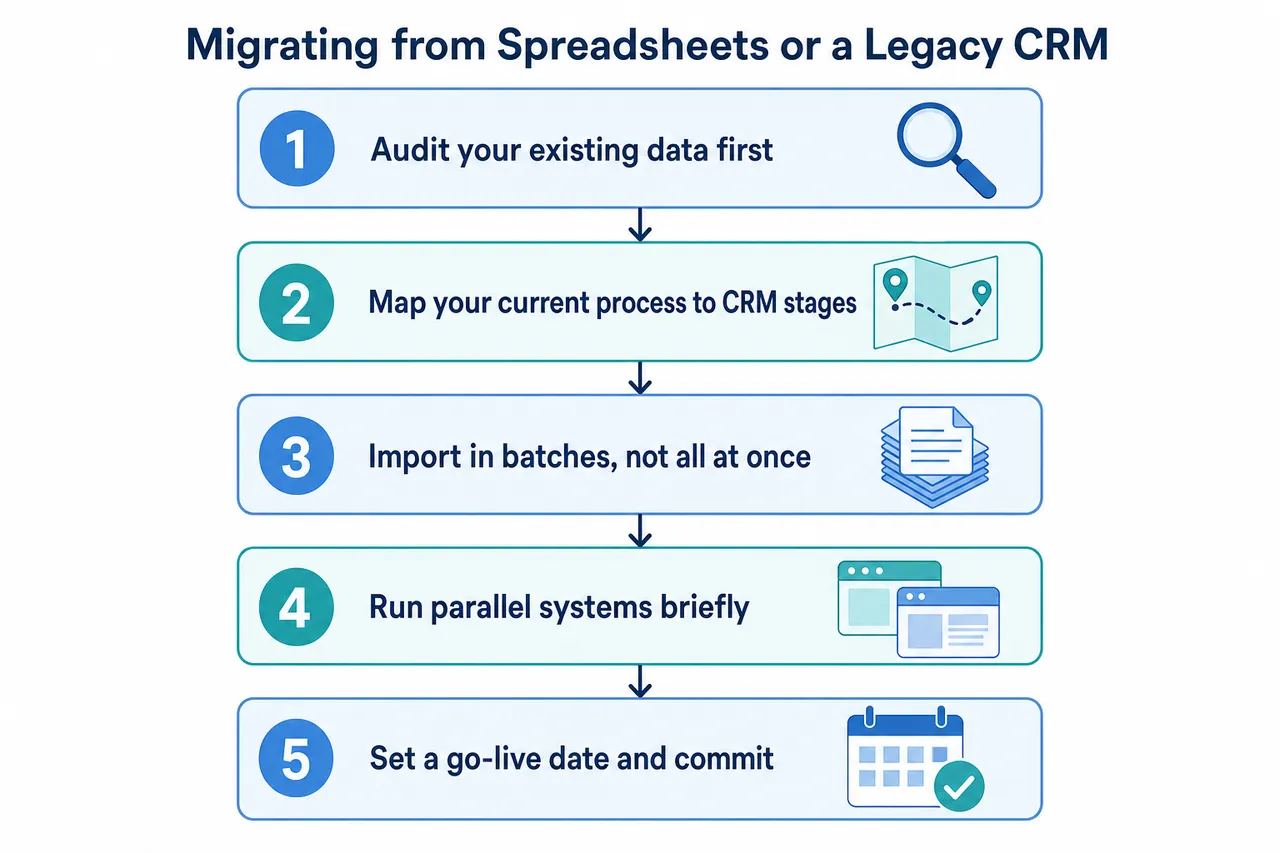
You're probably running your business right now across spreadsheets, your phone's contacts, and email folders scattered everywhere. That works until it doesn't. Here's what to do when you're ready to move to a real CRM without torching your data or losing deals in the process:
- Audit your existing data first. Don't import anything until you've cleaned house. Remove duplicates, standardize your phone number formats, and tag each contact by what they are—buyer, seller, past client, sphere of influence. A messy import means a messy CRM. That debt takes months to pay back.
- Map your current process to CRM stages. How does a lead actually move from initial inquiry to closing in your business today? Write it down. Then build those exact pipeline stages into the CRM before go-live. And skip the default stages—they're generic for a reason.
- Import in batches, not all at once. Start with 20–30 contacts. Test that every field mapped correctly. Watch whether automated workflows fire off on historical contacts when they shouldn't.
- Run parallel systems briefly. Keep your old spreadsheet or legacy CRM running for two to four weeks while you validate the new system works. Don't delete anything until you've confirmed the data actually came through intact.
- Set a go-live date and commit. Indefinite parallel operation kills most migrations. Pick a hard date. After that date, the new CRM is the only system of record—period.
Moving from one CRM to another? Most platforms offer CSV import tools, and some provide white-glove migration support. Ask about this during your demo. Migration support quality varies wildly, and you won't find it in the marketing materials.
Back to topMeasuring CRM ROI: What to Track
Stop guessing whether your CRM is worth it. You need measurable performance metrics—not vibes about being organized. Here's what actually matters:
- Speed to lead: Minutes between lead capture and your first contact attempt. Leads you reach within 5 minutes convert dramatically higher than those you hit after 30 minutes. That's not opinion—that's industry data. Your CRM dashboard should track this by agent and by lead source, so you can see exactly who's moving fast and who isn't.
- Lead-to-appointment rate: Simple math: what percentage of your captured leads actually show up? If this number climbs after you automate follow-ups, your CRM is earning its keep.
- Deal velocity: How many days from first contact to closed transaction on average? A good CRM surfaces stalled deals and nags you with timely follow-ups. That usually shortens the timeline.
- Source ROI: Compare cost per lead against revenue from deals closed from that source. Everything flows into one system with source tagging? Now you can actually see which channels make money and which ones don't. And when you're stress-testing whether a specific deal pencils out, our cash-on-cash return calculator models your actual return against total acquisition and marketing spend.
- Database growth rate: New, clean contacts added each month. And be honest—are they coming from active lead capture, or are you just shuffling old contacts around? A healthy database actually grows.
CRM Features for Specialized Real Estate Niches
Residential resale dominates the CRM market—30–90 day pipelines, buyer-seller transactions, commission checks. But if you're running commercial deals, luxury portfolios, flips, or rentals? Most platforms won't cut it out of the box. Here's what actually matters for your niche:
- Commercial real estate: Longer timelines. More stakeholders. You're tracking lease terms, cap rates, NOI data—all alongside contact info. Salesforce and Zoho give you that flexibility. Residential-specific tools don't. When you're evaluating a deal, our cap rate calculator and gross rent multiplier calculator will model your returns. Your CRM handles the relationship tracking.
- Luxury residential: These clients aren't receiving your drip campaigns. They want personalized attention. Look for CRMs with deep personalization tokens in email templates and detailed interaction logs—the kind that show you never treat a high-net-worth client like row 47 in a mass sequence.
- Fix-and-flip investors: Standard agent pipeline stages don't apply to you. You're tracking acquisition cost, rehab budget, hold time, exit strategy. Pipedrive, HighLevel, or Pebble give you that customization. Run your deal math through our fix and flip calculator while your CRM manages the relationships separately.
- Buy-and-hold investors: Most real estate CRMs weren't built for rental portfolio management. You need tenant tracking, lease management, property performance analysis—that's separate work. But the CRM still handles your acquisition pipeline and seller relationships. Validate deals with our rental property calculator or BRRRR calculator before they hit your pipeline.
Looking for a broader tech stack? Our article on the Best Phone Systems for Real Estate Investors covers VoIP and communication tools that actually integrate with the CRM platforms we mention.
Back to topConclusion: Choosing the Right Real Estate CRM
There's no one-size-fits-all winner here. Your best fit depends on your deal volume, how many people are on your team, what you can spend, and whether you need a simple contact manager or a full ecosystem with lead gen and IDX baked in.
Quick breakdown: Wise Agent crushes it for solo operators who want comprehensive features without per-user fees. Follow Up Boss wins for aggressive teams pulling leads from paid channels across multiple platforms. HubSpot is your entry point if you're looking for free CRM access plus marketing tools you can scale into. Salesforce makes sense when you're running a brokerage and need serious customization and automation at the enterprise level. Lofty and BoldTrail are your answer if you want IDX lead generation native to your CRM—no third-party integrations.
But here's what actually matters: a platform only generates returns if your team uses it every single day. Set up your data entry workflows from month one. Track the metrics that move your business—how fast you're hitting leads, your conversion percentage, and deal velocity. Start measuring these on day one. The best CRM in the market doesn't help if nobody logs in.
Back to topFrequently Asked Questions
What's the best real estate CRM for a solo agent on a budget?
Wise Agent wins here. At $49/month for up to 5 users, you get contact management, drip campaigns, transaction tracking, and landing pages—everything you actually need without paying for bloat. If you're just getting started and want zero monthly commitment, HubSpot's free tier handles up to 2 users and lets you dip your toes in before spending anything.
Does Follow Up Boss include calling and texting?
No. They're add-ons, and they'll cost you. We're talking $39/user/month on monthly billing, or $33/user/month if you commit annually—and that's only for Grow plan users. When you're stacking your total CRM cost, don't forget to add these charges in. Some competitors bake calling and texting straight into their base price, so compare apples to apples.
Can real estate investors use agent-focused CRMs?
You can, but you're fighting the system. Most agent CRMs think in terms of buyer/seller transactions. They don't understand deal underwriting, LOI tracking, or BRRRR workflows the way you need them to. Investors typically get better mileage from something more flexible—Pipedrive, HighLevel, or Pebble for the relationship layer—then layer in separate tools for the analysis. Our DSCR calculator and cash-on-cash return calculator are both free and work alongside whatever CRM you pick for the actual numbers.
What should I look for when migrating from one CRM to another?
Three things matter most: data portability (can you actually export your contacts and notes?), migration support (is the new vendor giving you white-glove import help or leaving you on your own?), and a solid parallel-run window where both systems live side-by-side before you kill the old one. And here's what most people learn the hard way—clean your data before you move it. A messy import means a messy CRM for the next three years.
Are there real estate CRMs specifically designed for commercial real estate?
Not many mainstream players are purpose-built for commercial. Your best move is usually a heavily customizable platform—Salesforce or Zoho—where you can build out deal stages, property fields, and lease tracking to match your actual workflow. Buildout and ClientLook exist for commercial brokers, but they're specialized tools outside what we've covered here. Want to evaluate a commercial deal with cap rate modeling or DSCR analysis? Our cap rate calculator and DSCR calculator work independent of your CRM choice.
Back to top